To do this: On Steam, click "Add a Game", then click "Add a Non-Steam Game", then click "Browse", then navigate to where you downloaded the game and double click "Juler's Mod" or "Juler's Mod.exe".
After that, go back to Steam and click "Add Selected Programs". Go to "Juler's Mod" and hit "Play".
← Return to game
Comments
Log in with itch.io to leave a comment.
it crashes for me whenever i load it up, how do i fix this?
There should be an error report when the game crashes. What type of problem are you seeing?
there isnt, it just keeps crashin
Most likely a PC side problem, What are your PC specs?
Otherwise this might be the 10% easter egg. Try launching the game again.
this is what i see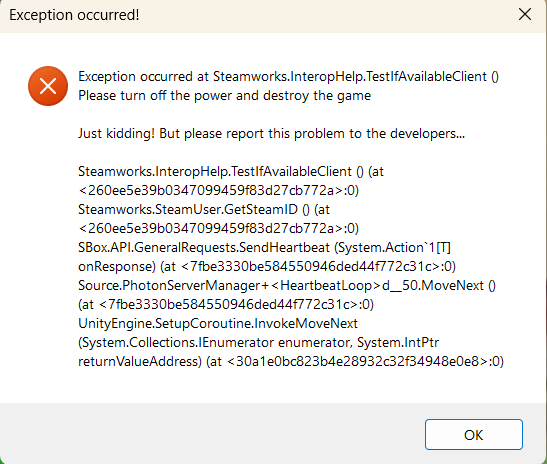
This is because you don't have Steam installed or running.
Please install Steam / launch it and log in / create an account.
i already have stea
Try adding the game's executable file to Steam.
To do this: On Steam, click "Add a Game", then click "Add a Non-Steam Game", then click "Browse", then navigate to where you downloaded the game and double click "Juler's Mod" or "Juler's Mod.exe".
After that, go back to Steam and click "Add Selected Programs". Go to "Juler's Mod" and hit "Play".
i have to wait for it to fully load ---------------------------------------
It also crashes when i try to put the graphics down